Scalable WordPress on AWS
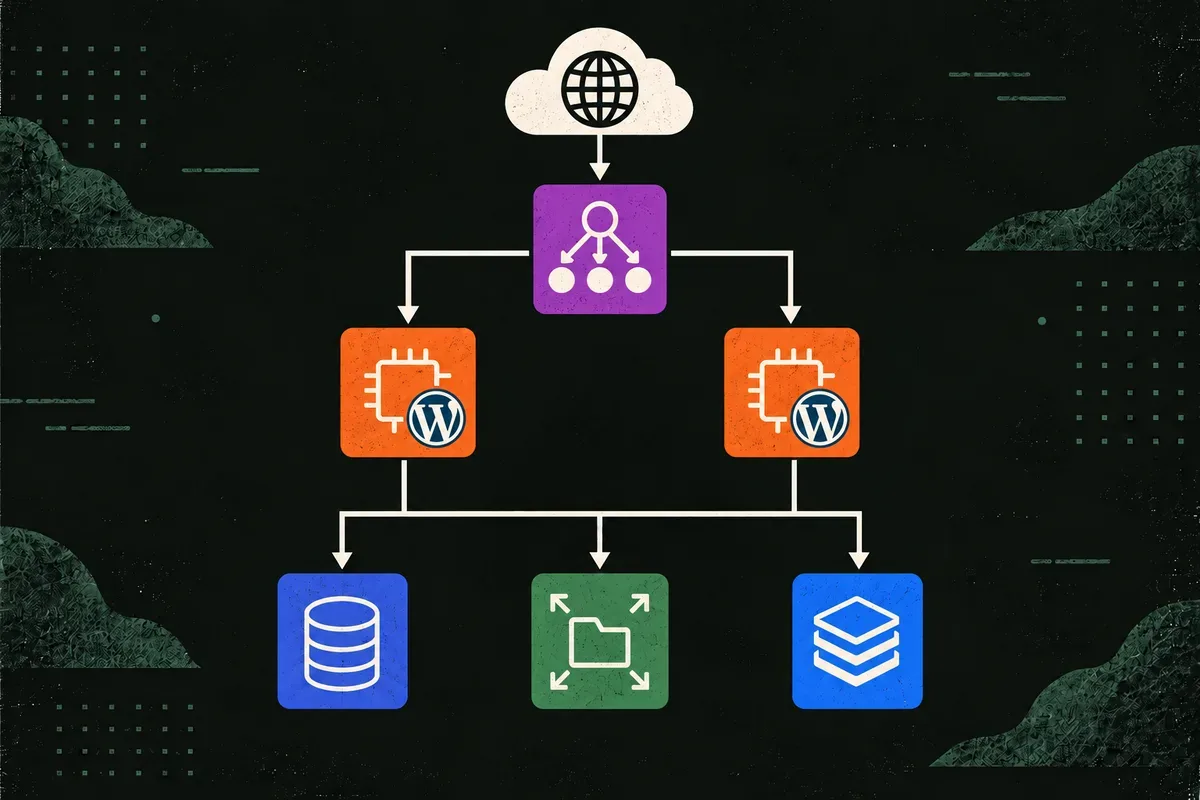
$ terraform apply
[ ok ] public load balancer
[ ok ] private wordpress instances
[ ok ] isolated mysql database
[ ok ] shared uploads + object cache
ready -> http://wordpress-....elb.amazonaws.com
Scalable WordPress takes the classic “one public server and a database on the same box” WordPress setup and turns it into a production-style AWS stack. The point was not to reinvent WordPress. It was to make the infrastructure around it behave like something I would be comfortable operating: private compute, isolated data services, repeatable provisioning, shared state, backups, TLS, observability, and a clean path to horizontal scaling.
The architecture
Internet -> Application Load Balancer -> EC2 Auto Scaling group
                                                   |
                             +---------------------+---------------------+
                             |                     |                     |
                             v                     v                     v
                        RDS MySQL             EFS uploads          Valkey cache
The VPC spans two Availability Zones and has three distinct network tiers:
- Public subnets contain the load balancer and NAT gateways.
- Private application subnets contain the WordPress instances, EFS mount targets, and cache.
- Isolated database subnets contain RDS with no route to the internet.
Only the load balancer accepts public traffic. The EC2 instances have no public IP addresses, no SSH keys, and no inbound port 22. Security groups describe the allowed service paths: ALB to WordPress, then WordPress to MySQL, EFS, and Valkey.
Making WordPress horizontal
Adding an Auto Scaling group is easy. Making the application safe to scale is the real work.
WordPress normally keeps uploaded media on the local filesystem. If two instances handled requests independently, an image uploaded through one might not exist on the other. This stack mounts EFS for uploads, so every instance sees the same files. RDS MySQL holds the database, and ElastiCache Serverless for Valkey provides a shared object cache.
With state moved out of the instances, the load balancer can send a request to any healthy target. The default capacity is two EC2 instances across two Availability Zones, and Auto Scaling tracks average CPU utilization around 60%. If an instance is replaced, it can bootstrap itself instead of requiring manual repair.
Production-shaped baseline
The stack includes the operational pieces I expect around a production-style WordPress deployment:
- Multi-AZ RDS for database availability.
- Two EC2 instances run across two Availability Zones.
- RDS automated backups are retained for 14 days.
- EFS automatic backups protect shared uploads.
- Encrypted storage is used for RDS and EFS.
- Deletion protection guards stateful and edge resources.
- CloudWatch Agent ships Nginx logs and basic memory/disk metrics.
- ALB health checks use a dedicated
/healthzendpoint.
Bootstrapping instead of configuring by hand
The launch template renders a user-data script that installs and configures the whole application layer:
Amazon Linux 2023
  ├── Nginx + PHP-FPM
  ├── WP-CLI + WordPress
  ├── EFS mount
  ├── RDS connection
  └── Redis-compatible object cache
The RDS password is generated by AWS and stored in Secrets Manager. At boot,
the instance retrieves that specific secret through a narrowly scoped IAM role.
There is no database password in terraform.tfvars.
The same user-data script also configures the ALB health endpoint, forwards PHP to PHP-FPM over a Unix socket, enables normal WordPress permalink routing, installs the Redis object-cache plugin, mounts EFS over TLS, and starts the CloudWatch Agent. Admin access goes through Systems Manager Session Manager instead of SSH.
HTTPS when there is a domain
The same configuration works behind the ALB hostname or with a real domain.
Setting domain_name requests an ACM certificate, prints the DNS validation
records, enables an HTTPS listener, and redirects HTTP to HTTPS after
validation.
That conditional path matters for a reusable example: a domain shouldn’t be a prerequisite for testing the infrastructure, but TLS should be part of the design when one is available.
The honest trade-offs
The stack favors production-style resilience, but every choice has a bill. Two NAT gateways keep each private subnet using outbound internet access in its own Availability Zone, which avoids a cross-zone dependency for updates and SSM. They are also one of the largest fixed costs in the design.
Multi-AZ RDS, two EC2 instances, EFS, an ALB, ElastiCache Serverless, backups, and CloudWatch all cost real money. A development variant could reduce the NAT count, lower capacity, or lean more heavily on VPC endpoints, accepting different availability and complexity trade-offs.
Deletion protection adds intentional friction before teardown: set
deletion_protection = false, apply that change, and then run
terraform destroy. RDS still creates a final snapshot during teardown.
Scaling isn’t adding more servers. It’s removing the assumptions that only one server exists.
The result is still WordPress, but the infrastructure around it is private by default, replaceable, backed up, observable through AWS, and completely described in Terraform.